Support
Reach out to VGT Support for assistance with your VGT simulator system.
Contact: Paul Stary
Hours: 7 AM-6 PM Pacific, Mon-Sun
Phone: 949-646-8877
SMS: 949-283-0010 (anytime)
Email: paul@starytech.com
Click the button to the left to download and run a small app that will generate a 9-digit code.
When we have that code, we can access your VGT PC.
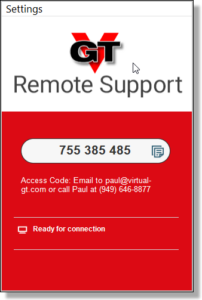
Use this link to install Splashtop Remote Support software.
Keeping your VirtualGT PC Updated:
The software on your VGT PC needs to be periodically updated.
Some of these updates are automatically managed by the Windows operating system. Most game software requires you to manually update it.
These updates may introduce problems with the operation of your PC and or games, depending on how long your PC has been offline between updates.
Contact VGT Support for assistance if your PC doesn’t boot or does not run racing game software correctly.
Phone: (949) 646-8877 (7AM-6PM Pacific, Mon-Sun)
SMS: (949) 283-0010 (anytime)
Email: paul@starytech.com
Remote Support:
The first step required to support your VGT PC is to ensure you have Splashtop Streamer remote support software installed and running.
To check if you have Splashtop installed, simply type “splash” into the “search bar” on left side of your Windows Taskbar (that’s the bar of icons that runs across the bottom of your screen.
If you DO have it installed, you will see “Splashtop Streamer” app at the top of the search results window (as shown below).
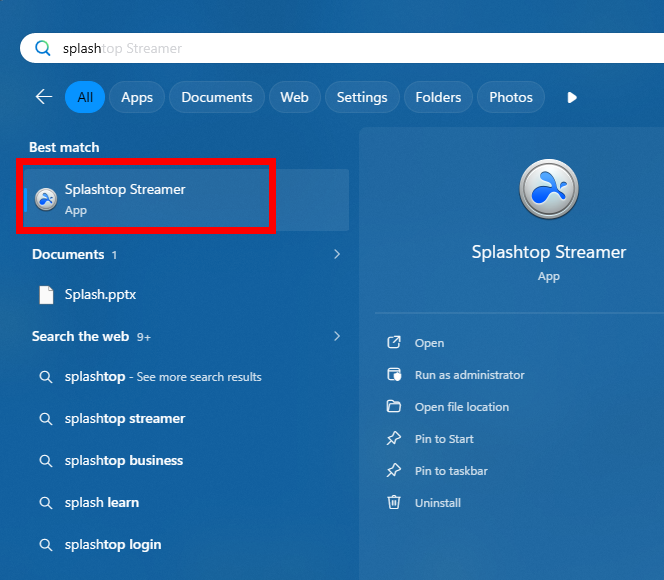
If the only search results are shown in the list below, you DO NOT have Spalshtop Installed.
NOTE: If you have not connected with VGT Support since Feb 2025, you DO NOT have Splashtop installed.
Install Splashtop Streamer:
Please use this link to install Splashtop Streamer. After clicking the link, check the “I trust the organization above…” to proceed.
Click here for step-by-step instructions.
This will download a small file into your PC’s Downloads folder. Find this file and run it (dbl-click it).
Follow on-screen instructions and when the installation is finished, you will see this window.
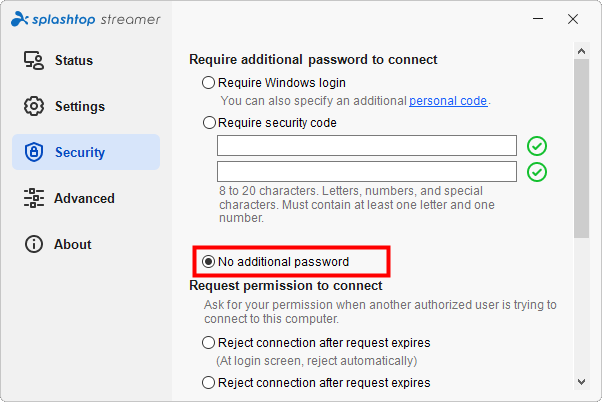
Click on the Security menu to the left and ensure the selection at the right is set to “No Additional Password”.
This will allow VGT Support to log onto your PC where we can then add a password to secure our access. After that, we are the only ones who can log onto your VGT PC.
Once Splashtop Streamer is installed and your PC is running, we are be able to access it and share the screen(s) to add files, check operation, perform updates, make repairs and help you with any issues you may encounter with the hardware and software.
Support for repairs or updates to your VirtualGT racing simulator cockpit.